Overview
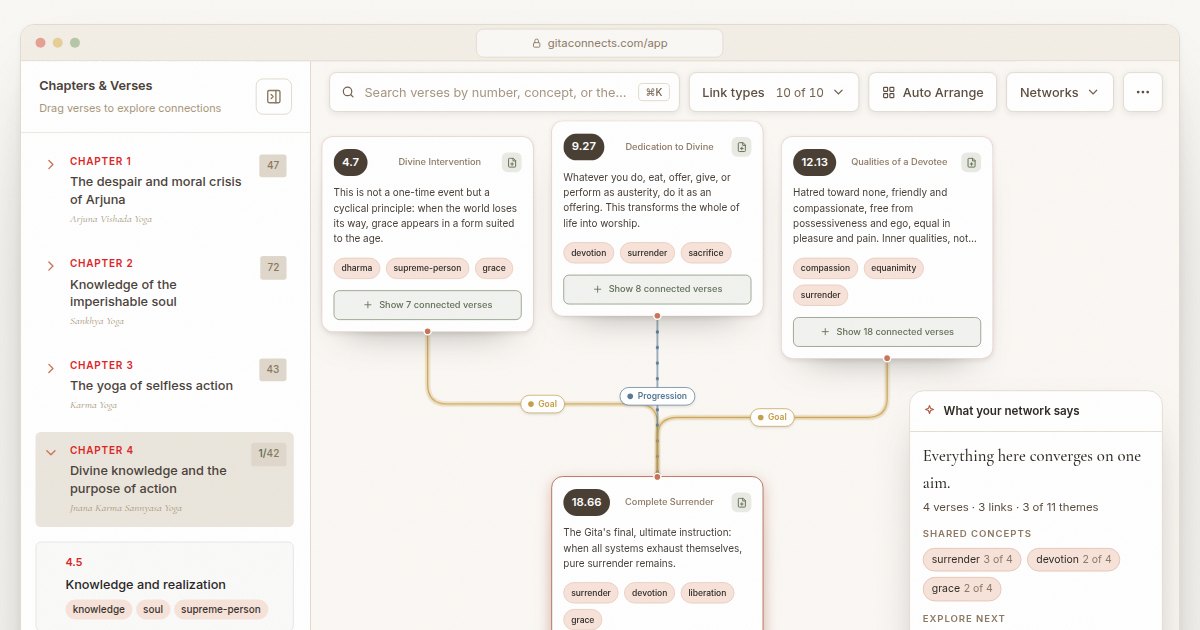
The summaryGitaConnects is a web‑based application that visualizes the entire Bhagavad Gita as an interactive network. According to the site, the app includes all 701 verses, each annotated with a short reading, theme, and key concepts, and it runs entirely in the browser without requiring an account. Users can click any verse to fan out the verses it links to, revealing 1,057 curated connections across the eighteen chapters. The canvas shows ten link types, each colour‑coded, with a one‑line rationale for why two verses are linked. The platform also lets users create their own connections by dragging verses together, add personal notes, and view live panels that surface shared ideas, thematic progressions, or contrasts. Work can be exported as PNG or PDF, and saved networks can be exported and imported as files. The product is positioned for anyone interested in studying the Gita’s structure, from individual learners to small study groups, offering a visual way to explore recurring themes such as surrender, duty, and devotion.
GitaConnects is a free browser-based canvas that maps all 701 Bhagavad Gita verses and the thematic links between them.
What this product is
In plain languageGitaConnects is a web‑based application that visualizes the entire Bhagavad Gita as an interactive network. According to the site, the app includes all 701 verses, each annotated with a short reading, theme, and key concepts, and it runs entirely in the browser without requiring an account. Users can click any verse to fan out the verses it links to, revealing 1,057 curated connections across the eighteen chapters. The canvas shows ten link types, each colour‑coded, with a one‑line rationale for why two verses are linked. The platform also lets users create their own connections by dragging verses together, add personal notes, and view live panels that surface shared ideas, thematic progressions, or contrasts. Work can be exported as PNG or PDF, and saved networks can be exported and imported as files. The product is positioned for anyone interested in studying the Gita’s structure, from individual learners to small study groups, offering a visual way to explore recurring themes such as surrender, duty, and devotion.
From Gita Connects's own site:“See how the Bhagavad Gita’s verses speak to each other”
What makes Gita Connects different?
vs. alternatives in this categoryGita Connects distinguishes itself by turning the Bhagavad Gita into a searchable, visual network rather than a linear text. Its curated set of over a thousand thematic links and ten distinct link types provide a structured way to see how verses echo each other across chapters. The ability to add custom connections and notes directly in the browser, combined with a completely free, no‑account model, creates a low‑friction environment for personal study and exploration.
Key features
From the product's own siteAn interactive web canvas displays all 701 verses, allowing users to click and expand connections across chapters.
The site provides 1,057 pre‑built links that explain thematic relationships between verses, each labelled with type and strength.
Users can drag any two verses together to create personal links and attach notes, which are saved automatically.
Live panels identify shared ideas, progression paths, or contrasts among the selected verses and suggest next reading steps.
A shortcut (⌘K) lets users find verses by number, concept, or theme, making navigation quick.
Ten colour‑coded link categories convey why verses are related, with a one‑line explanation for each.
Who it's for
Grounded in pricing, the site's own claims, and categoryShould use this
Individuals or small groups who want a free, visual way to study the Bhagavad Gita’s themes. Ideal for learners on a limited budget who prefer a browser‑only tool without sign‑up friction.
Shouldn't use this
Readers who want a traditional verse-by-verse commentary rather than a visual map of connections.
Use cases
Who uses this and whyA theology student uses Gita Connects to visualize thematic links between verses for a research paper because the app provides a canvas of curated connections across all chapters.
A meditation teacher uses Gita Connects to identify verses about devotion and surrender to craft lesson plans, leveraging the searchable concepts and link types.
An individual practitioner uses Gita Connects to explore personal interpretations, dragging verses to create custom networks and taking notes directly in the browser.
Where we found it
Little foundLittle found outside the product's own pages and its launch listing. Common for a new product. We found 0 independent sources. This is a count of places, not a judgement of whether the product's claims are true.
- Own siteProduct website
- Product HuntProduct Hunt listing
What works
Grounded in the site's own pages and the evidence foundThe site says the app is free and does not require an account, providing immediate access to all verses. It also states that it includes all 701 verses and offers 1,057 curated links across the whole Gita. The interactive canvas and custom linking features let users build and annotate their own verse networks.
What to know
Caveats, gotchas, and gapsPricing information is not disclosed on the site; no tier or price details are listed. The homepage does not explain export formats, collaborative capabilities, or offline functionality, leaving those aspects unclear. This is a recent launch with limited third‑party coverage.
Pros & cons
+Pros
- Free to use without an account, allowing instant access to the full set of 701 verses.
- Provides 1,057 curated links that reveal thematic relationships across all eighteen chapters of the Gita.
- Interactive canvas lets users drag verses, create custom connections, and annotate notes directly in the browser.
−Cons
- The 1,057 links are the creator's own curated reading, so they show one interpretation of how the verses connect.
- Each verse carries only a short reading, theme and key concepts, so it complements a full commentary rather than replacing one.
- Notes and custom links are saved in the browser; moving them between devices relies on optional sign-in or file export.
What the site says
3 from its own pagesStatements taken from Gita Connects's own pages, each with the page it came from. We list them; we do not rule on whether they are true.
- The app is free and does not require an account.gitaconnects.com
- It provides 1,057 curated links across the whole Gita.gitaconnects.com
- It includes all 701 verses of the Bhagavad Gita.gitaconnects.com
What others say
0 outside pagesWe found no independent pages about Gita Connects yet. That is normal for a new launch, and it is a fact about coverage, not a mark against the product.
How we checked this one
Full methodologyThis review was produced by the SaaSNet.work pipeline — no hands-on testing, no payment from the product. Here's exactly what was checked for Gita Connects.
We never tested the product hands-on and never accepted payment for this review. Spot something wrong? Request a correction.
Frequently asked questions
3 questionsIs Gita Connects free?
The site says the app is free and does not require an account.
How much does Gita Connects cost?
The pricing page does not list any tiers or prices, so pricing is not disclosed on the site.
What are Gita Connects's main limitations?
The product does not specify export formats, collaboration features, or offline capabilities, and pricing information is absent.
Looking for alternatives to Gita Connects?
Browse all
CastGhost is a live podcast search and pitch ghostwriting tool that lets professionals draft personalized pitches for free and pay per use.
Guitar Harmony Helper is a browser‑based tab editor that lets guitarists write riffs, find matching scales, and generate harmony parts.

CancelShut provides hosted Stripe cancellation flows with retention offers and analytics to help SaaS businesses reduce churn.
Get the badge
For the Gita Connects teamShow your customers this audit was independently verified. Paste this HTML anywhere on your site — the badge auto-updates if our audit changes.