
Overview
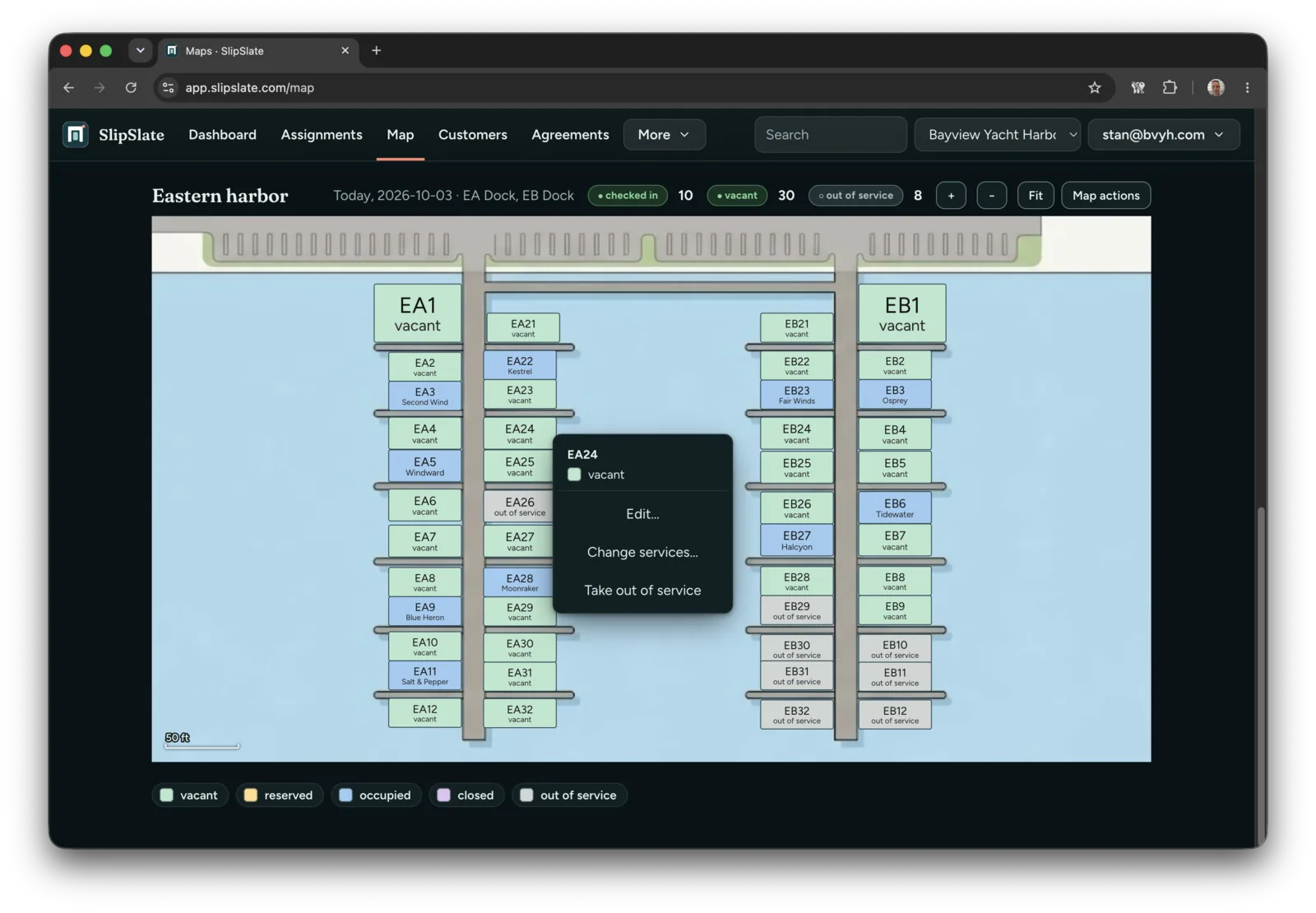
The summarySlipSlate positions itself as an operating record for independent marinas, consolidating information about which boat occupies which slip, the dates of occupancy, the associated lease agreements, and any follow‑up actions required. The platform replaces the traditional mix of whiteboards, spreadsheets and individual memory with a single, date‑aware slip map that validates boat length against slip size, tracks agreements, records meter readings and maintains an audit trail. The service is targeted at marina operators who need a reliable way to prevent double‑bookings, avoid assigning oversized vessels to undersized slips, and automate seasonal renewal reminders. SlipSlate imports existing data via CSV, builds a visual layout of the harbor (the site promises a working map within five business days of receiving complete data), and offers optional payment processing through the user’s own Stripe account. Users can interact with the live map on the dock via a chat‑style interface, capture readings with photos, and export data at any time.
SlipSlate is a cloud‑based record system for independent marinas that centralises slip assignments, agreements and meter readings.
What this product is
In plain languageSlipSlate positions itself as an operating record for independent marinas, consolidating information about which boat occupies which slip, the dates of occupancy, the associated lease agreements, and any follow‑up actions required. The platform replaces the traditional mix of whiteboards, spreadsheets and individual memory with a single, date‑aware slip map that validates boat length against slip size, tracks agreements, records meter readings and maintains an audit trail. The service is targeted at marina operators who need a reliable way to prevent double‑bookings, avoid assigning oversized vessels to undersized slips, and automate seasonal renewal reminders. SlipSlate imports existing data via CSV, builds a visual layout of the harbor (the site promises a working map within five business days of receiving complete data), and offers optional payment processing through the user’s own Stripe account. Users can interact with the live map on the dock via a chat‑style interface, capture readings with photos, and export data at any time.
From SlipSlate's own site:“Every slip. Every boat. Calmly under control.”
What makes SlipSlate different?
vs. alternatives in this categorySlipSlate’s primary angle is consolidating all harbor‑related data—boat assignments, slip dimensions, lease terms and meter readings—into a single, visual, date‑aware map. Unlike generic spreadsheet or whiteboard solutions, it adds automatic size checks and an audit trail, while keeping payment processing optional and fee‑free. The promise of delivering a functional map within five business days after data upload also sets a concrete implementation timeline for new users.
Key features
From the product's own siteShows which boat occupies each slip on any given date, helping prevent double‑bookings.
Checks boat length against slip rating before assignment, reducing mismatches.
Records lease agreements, meter readings and provides an audit trail for each slip.
Enables invoicing and payment collection on the user’s Stripe account; the site notes payments are optional.
Allows staff to walk the docks, enter or photograph readings, and confirm entries before saving.
All data can be exported on demand, ensuring owners retain full control of their records.
Who it's for
Grounded in pricing, the site's own claims, and categoryShould use this
Independent marinas that manage multiple slips, need a single source of truth for boat assignments, and have a budget for a cloud‑based management tool.
Shouldn't use this
Marinas that require a free‑forever solution, extensive custom integrations, or built‑in payment processing that takes a percentage of rent.
Use cases
Who uses this and whyMarina managers use SlipSlate to assign boats to slips without risking double‑bookings because the date‑aware map flags conflicts instantly.
Dock staff use the chat‑style interface to record meter readings on‑site, reducing manual data entry errors and ensuring a read‑back before saving.
Finance teams generate invoices and optional Stripe payments directly from the platform, avoiding third‑party rent percentages.
Where we found it
Little foundLittle found outside the product's own pages and its launch listing. Common for a new product. We found 0 independent sources. This is a count of places, not a judgement of whether the product's claims are true.
- Own siteProduct website
- Pricing pagePricing page
- Product HuntProduct Hunt listing
What works
Grounded in the site's own pages and the evidence foundThe site says the map can be ready within five business days after complete data is provided, and that payments are optional with no percentage of rent taken. Pricing is clearly disclosed across three tiers (Harbor $239/mo, Marina $359/mo, Port $599/mo).
What to know
Caveats, gotchas, and gapsPricing is offered via three monthly plans with no free tier; the site does not list any usage limits. The homepage does not detail how data imports are validated or how the chat interface integrates with existing hardware. This is a recent launch with limited third‑party coverage.
Pros & cons
+Pros
- Provides a single, visual, date‑aware map of all slip assignments.
- Includes automatic boat‑size validation to prevent mismatches.
- Payments are optional and no rent percentage is taken.
−Cons
- No free tier or trial is advertised, which may be a barrier for small marinas.
- Limited public information on data import validation and integration options.
- Third‑party coverage is minimal, offering few independent reviews.
Pricing
Last checked October 30, 2026What the site says
3 from its own pagesStatements taken from SlipSlate's own pages, each with the page it came from. We list them; we do not rule on whether they are true.
- Payments are optionalslipslate.com
- No percentage of rentslipslate.com
- Target: working map in five business days from complete dataslipslate.com
What others say
0 outside pagesWe found no independent pages about SlipSlate yet. That is normal for a new launch, and it is a fact about coverage, not a mark against the product.
How we checked this one
Full methodologyThis review was produced by the SaaSNet.work pipeline — no hands-on testing, no payment from the product. Here's exactly what was checked for SlipSlate.
We never tested the product hands-on and never accepted payment for this review. Spot something wrong? Request a correction.
Frequently asked questions
4 questionsIs SlipSlate free?
No. The site lists three paid plans—Harbor $239/month, Marina $359/month, and Port $599/month—with no free tier.
How much does SlipSlate cost?
Pricing starts at $239 per month for the Harbor tier and goes up to $599 per month for the Port tier.
Are payments mandatory?
Payments are optional; the site states that payment processing runs on the user’s own Stripe account and no percentage of rent is taken.
What limits does SlipSlate impose?
The pricing data does not list any explicit limits for the plans.
Looking for alternatives to SlipSlate?
Browse allByteSend is an open‑source email service that lets developers send transactional and marketing messages via API, SMTP relay, or SDKs.

Taskatk is a unified workspace that merges task boards, time tracking, approvals and reporting for teams in one place.
SocialGrovv lets creators generate faceless, narrated YouTube videos and Shorts automatically, eliminating camera work and editing.
Get the badge
For the SlipSlate teamShow your customers this audit was independently verified. Paste this HTML anywhere on your site — the badge auto-updates if our audit changes.