
Overview
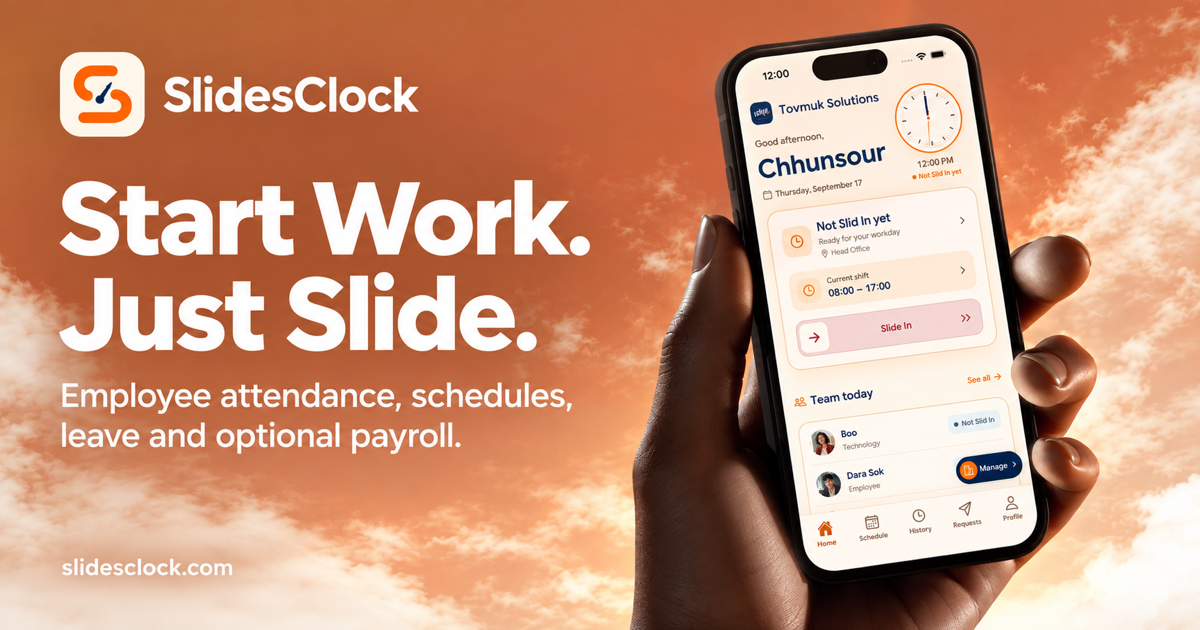
The summarySlidesClock positions itself as a free employee attendance solution for small teams. According to the homepage, workers use their own smartphones to ‘slide’ to clock in and out. Each clock‑in is verified against the workplace’s GPS location, Wi‑Fi network, or a registered device, and the timestamp is taken from a server rather than the phone. The app bundles attendance records with schedule views, shift calendars, leave and overtime requests, and an optional payroll module that can generate digital payslips. The product targets teams that need a simple, hardware‑free way to track work hours. Users see their own history and managers can review aggregated team data in a shared view. SlidesClock offers a free tier for up to five users and a paid Premium tier at $29.99 per month. A Team tier exists but its pricing is not disclosed. The site also mentions a “Standard plan” costing $12.99 per month, though that price does not appear in the structured pricing table. The overall promise is a unified, low‑cost platform that replaces traditional time‑clocks and manual timesheets.
SlidesClock is a free attendance app that lets small teams clock in with a slide gesture verified by GPS or Wi‑Fi.
What this product is
In plain languageSlidesClock positions itself as a free employee attendance solution for small teams. According to the homepage, workers use their own smartphones to ‘slide’ to clock in and out. Each clock‑in is verified against the workplace’s GPS location, Wi‑Fi network, or a registered device, and the timestamp is taken from a server rather than the phone. The app bundles attendance records with schedule views, shift calendars, leave and overtime requests, and an optional payroll module that can generate digital payslips. The product targets teams that need a simple, hardware‑free way to track work hours. Users see their own history and managers can review aggregated team data in a shared view. SlidesClock offers a free tier for up to five users and a paid Premium tier at $29.99 per month. A Team tier exists but its pricing is not disclosed. The site also mentions a “Standard plan” costing $12.99 per month, though that price does not appear in the structured pricing table. The overall promise is a unified, low‑cost platform that replaces traditional time‑clocks and manual timesheets.
From SlidesClock's own site:“Free attendance app: verified clock-in for small teams”
What makes SlidesClock different?
vs. alternatives in this categorySlidesClock differentiates itself by combining a single‑slide clock‑in gesture with real‑time GPS and Wi‑Fi verification, eliminating the need for dedicated time‑clock hardware. Its free tier for up to five users makes it attractive for micro‑businesses, cafés, or small project crews that want immediate attendance tracking without upfront costs. The optional payroll module adds a path toward full HR coverage, but remains separate, allowing teams to adopt only the features they need. By centralizing schedules, leave requests, and overtime in the same interface, SlidesClock aims to be an all‑in‑one attendance hub for teams that prioritize simplicity over extensive enterprise features.
Key features
From the product's own siteEmployees slide to clock in and out; each gesture creates a server‑recorded timestamp that is easy to review.
Every clock‑in is checked against the workplace’s location, Wi‑Fi network, or a registered device to confirm legitimacy.
A shared calendar shows who is working, where, and when, with weekly views for easy planning.
Staff can request time off or overtime; managers approve directly within the app, reducing back‑and‑forth.
Approved attendance can flow into payroll calculations and generate digital payslips, though this feature is optional.
Admins can organize people, branches, and roles in one place, and invite new members through the app.
Who it's for
Grounded in pricing, the site's own claims, and categoryShould use this
SlidesClock is best suited for very small teams—typically five to ten people—who need a simple, free way to capture clock‑in data without buying hardware. It works well for budget‑conscious businesses that value a single‑gesture interface and basic schedule visibility.
Shouldn't use this
The app may not fit larger organizations that require extensive HR integrations, advanced analytics, or robust payroll processing. Teams that need guaranteed payroll inclusion or multi‑site compliance might outgrow the free tier and the disclosed Premium price.
Use cases
Who uses this and whyA café manager uses SlidesClock to log barista clock‑ins because the slide gesture and location verification remove the need for a physical time‑clock.
A remote design team of five members uses SlidesClock to track daily work hours and request leave, relying on the free tier to avoid extra software costs.
A small event staffing agency adopts SlidesClock for shift visibility and overtime tracking, leveraging the optional payroll feature to generate digital payslips for hourly workers.
Where we found it
Some coverage1 or 2 independent sources mention this product. We found 2 independent sources. This is a count of places, not a judgement of whether the product's claims are true.
- Own siteProduct website
- Pricing pagePricing page
- Product HuntProduct Hunt listing
- Independent2 independent sources — listed under “What others say” below
What works
Grounded in the site's own pages and the evidence foundThe site says a single slide starts and ends the workday, with GPS, Wi‑Fi or device checks confirming each entry. It also states that the free tier covers the first five users and that Premium costs $29.99 per month. An external Reddit post describes SlidesClock as a simple attendance and workforce‑management app, reinforcing the focus on ease of use.
What to know
Caveats, gotchas, and gapsThe free tier is limited to the first five people, as the site notes. Pricing is partially unclear because the site also mentions a $12.99 Standard plan that does not appear in the structured pricing table, while the Premium tier is listed at $29.99 /mo. The Team tier exists but its cost is undisclosed. The product’s pages do not explain how payroll integration works or whether it requires the Premium plan. This is a recent launch with limited third‑party coverage.
Pros & cons
+Pros
- Free tier covers up to five users, lowering entry cost for micro‑businesses.
- Slide gesture combined with GPS/Wi‑Fi verification provides a simple yet location‑aware clock‑in method.
- Schedules, leave requests, and optional payroll are all housed in a single interface.
−Cons
- Pricing is partially ambiguous; the site mentions a $12.99 Standard plan not reflected in the pricing table.
- Team tier pricing is undisclosed, making budgeting for larger groups difficult.
- No mention of integrations with external payroll or HR systems, limiting scalability.
What the site says
3 from its own pagesStatements taken from SlidesClock's own pages, each with the page it came from. We list them; we do not rule on whether they are true.
- Free for your first five people.slidesclock.com
- Standard plan costs $12.99 per month.slidesclock.com
- Each clock‑in is checked against your workplace’s location, Wi‑Fi or device policy.slidesclock.com
What others say
2 outside pagesPages from outside SlidesClock's own site that are about this product. Open them and decide for yourself.
- We just launched SlidesClock on the App Storereddit.com/r/SaasDevelopers/comments/1wmwpbh/we_just_launched_slidesclock_on_the_app_store
SlidesClock is an attendance and workforce management app designed for businesses that want a simpler way to manage employee clock-ins,
- Slides Clock - Saas at Tovmuk Solutionkh.linkedin.com/in/slides-clock-2baa3a437
Sep 22, 2026 — Saas at Tovmuk Solution · Experience: Tovmuk Solution · Location: Voat Phnum · 1 connection on LinkedIn. View Slides Clock's profile on LinkedIn ...
How we checked this one
Full methodologyThis review was produced by the SaaSNet.work pipeline — no hands-on testing, no payment from the product. Here's exactly what was checked for SlidesClock.
We never tested the product hands-on and never accepted payment for this review. Spot something wrong? Request a correction.
Frequently asked questions
3 questionsIs SlidesClock free?
Yes, the site says the app is free for the first five people, with a $0 per month tier listed in the pricing data.
How much does SlidesClock cost?
The pricing page lists a Premium tier at $29.99 per month. The site also mentions a Standard plan costing $12.99 per month, though that price is not reflected in the structured pricing table, and a Team tier is listed without disclosed pricing.
What are SlidesClock's main limitations?
The free tier caps usage at five users, payroll is optional and may require the Premium plan, and pricing for the Team tier is not disclosed. The product also does not mention integrations with other HR or accounting systems.
Looking for alternatives to SlidesClock?
Browse all
ProofSlider is a $29 lifetime visual proofing tool that lets contractors showcase before‑and‑after work via a single shareable link.
Worthorpass Checkout Checker verifies the exact price charged at Digistore24 checkout and records refund terms for each offer.
Rabbit Labs offers three free browser extensions—an ad blocker, a tab‑memory saver, and an online file converter—to streamline web browsing and file handling.
Get the badge
For the SlidesClock teamShow your customers this audit was independently verified. Paste this HTML anywhere on your site — the badge auto-updates if our audit changes.