
Overview
The summaryMilky Way Planner is a web‑based planning service aimed at astrophotographers who need to know when the Milky Way’s core will be above the horizon, how moon illumination will affect their shots, and which nights provide sufficient darkness. The home page explains that users can enter any set of coordinates and receive a month‑long calendar that rates visibility, lists galactic‑core rise times, and shows sunrise, sunset, and moon phase data. A free tier provides these core features without requiring an account, while a paid Premium tier adds a Moon Planner with super‑moon tracking, a multi‑stop trip planner, unlimited saved locations, and export options for PDF, Excel, or calendar files for $25 per year. An additional $200‑per‑year option allows workshop leaders to list unlimited astrophotography workshops on the platform. The service is positioned for individual photographers and small groups planning night‑time shoots or travel to dark‑sky sites. Users access the planner directly in a browser, input their desired location, and receive an at‑a‑glance view of the best nights for Milky Way imaging. Premium users gain extra planning granularity and data export capabilities, while workshop providers can reach a targeted audience through the site’s listings.
Milky Way Planner is a free web tool that shows nightly Milky Way visibility, galactic core timing, and moon phases for any location.
What this product is
In plain languageMilky Way Planner is a web‑based planning service aimed at astrophotographers who need to know when the Milky Way’s core will be above the horizon, how moon illumination will affect their shots, and which nights provide sufficient darkness. The home page explains that users can enter any set of coordinates and receive a month‑long calendar that rates visibility, lists galactic‑core rise times, and shows sunrise, sunset, and moon phase data. A free tier provides these core features without requiring an account, while a paid Premium tier adds a Moon Planner with super‑moon tracking, a multi‑stop trip planner, unlimited saved locations, and export options for PDF, Excel, or calendar files for $25 per year. An additional $200‑per‑year option allows workshop leaders to list unlimited astrophotography workshops on the platform. The service is positioned for individual photographers and small groups planning night‑time shoots or travel to dark‑sky sites. Users access the planner directly in a browser, input their desired location, and receive an at‑a‑glance view of the best nights for Milky Way imaging. Premium users gain extra planning granularity and data export capabilities, while workshop providers can reach a targeted audience through the site’s listings.
From Milky Way Planner's own site:“Free Milky Way planner: direction, timing, moon phase”
What makes Milky Way Planner different?
vs. alternatives in this categoryMilky Way Planner distinguishes itself by combining core Milky Way visibility data, galactic‑core rise times, and moon‑phase information on a single free web calendar, eliminating the need to cross‑reference multiple apps. Its premium upgrade adds specialized moon tracking, multi‑stop trip planning, and data export formats, while a separate workshop‑listing tier targets educators and tour operators. The product’s emphasis on a no‑account free tier and a modest annual subscription positions it as a low‑cost, niche tool for astrophotography planning.
Key features
From the product's own siteShows nightly Milky Way visibility ratings, galactic core timing, sunrise/sunset, and moon phases for any location without an account.
Adds super‑moon tracking, multi‑stop trip planning, unlimited saved locations, and PDF/Excel/calendar exports for $25 / year.
Allows instructors to list unlimited astrophotography workshops worldwide for $200 / year.
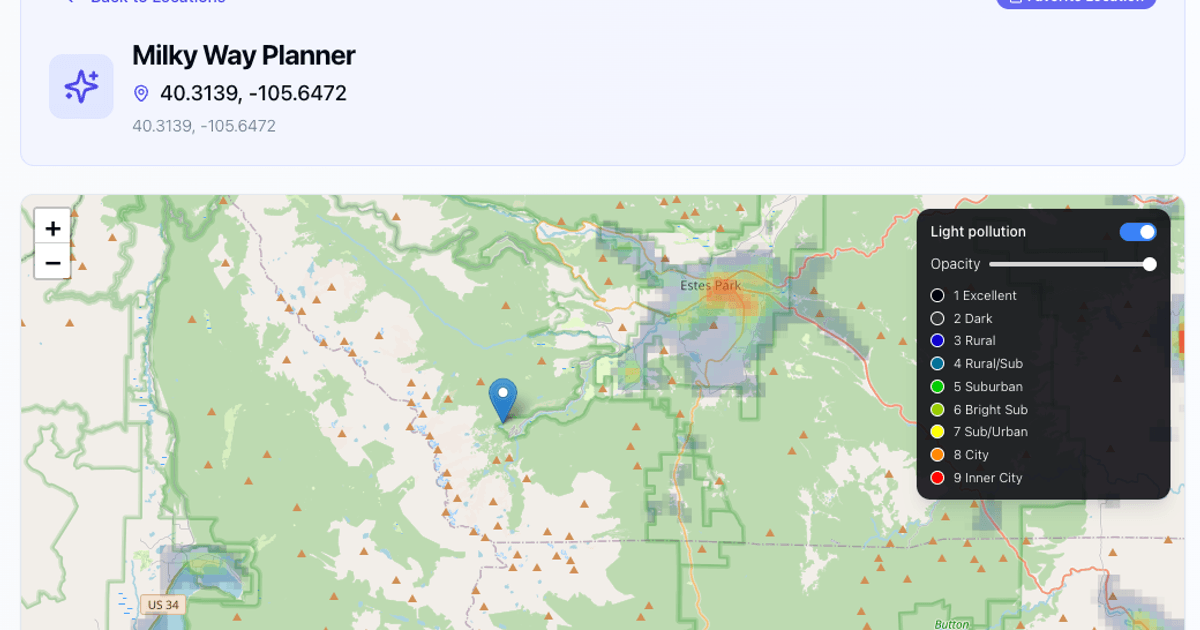
Users can enter coordinates directly to generate a month‑long view of visibility data for that spot.
Who it's for
Grounded in pricing, the site's own claims, and categoryShould use this
Individual astrophotographers or small teams who need a quick, web‑based view of Milky Way visibility and are comfortable paying $25 / year for export tools. Workshop organizers seeking a niche listing platform will also find value at $200 / year.
Shouldn't use this
Photographers who require integrated camera control, real‑time weather overlays, or a mobile app, as those capabilities are not mentioned. Users unwilling to pay for premium features will miss export and multi‑stop planning tools.
Use cases
Who uses this and whyAn astrophotographer uses Milky Way Planner to pick a night with a dark sky and the galactic core above the horizon, avoiding moonlit washout.
A workshop leader lists upcoming dark‑sky photography courses on Milky Way Planner to reach an audience already searching for optimal shooting windows.
A small travel group employs the Premium trip planner to map a multi‑stop itinerary across several dark‑sky locations, exporting the schedule to Excel for logistics.
Where we found it
Some coverage1 or 2 independent sources mention this product. We found 1 independent source. This is a count of places, not a judgement of whether the product's claims are true.
- Own siteProduct website
- Product HuntProduct Hunt listing
- Independent1 independent source — listed under “What others say” below
What works
Grounded in the site's own pages and the evidence foundThe site says the core calendar is free and requires no account, and that everything—including Moon Planner and export tools—costs $25 / year. It also states workshop listings are $200 / year for unlimited entries. An external Facebook post notes the product lets users view a month‑at‑a‑time Milky Way visibility calendar for any location.
What to know
Caveats, gotchas, and gapsPricing is disclosed as $25 per year for the Premium toolkit and $200 per year for unlimited workshop listings; no hidden tiers are shown. The free tier’s limits (e.g., number of saved locations or export options) are not detailed on the site. Coverage is limited, with only a handful of third‑party mentions of the calendar view.
Pros & cons
+Pros
- Free core calendar provides essential visibility, core timing, and moon data without an account.
- Transparent pricing lists a $25/year premium tier and a $200/year workshop listing tier.
- All data is presented for any coordinate, enabling global planning.
−Cons
- No mobile app or integrated weather data is mentioned, limiting on‑site flexibility.
- Export and multi‑stop planning features are locked behind a paid subscription.
- Limited third‑party coverage means few external reviews or comparisons are available.
What the site says
3 from its own pagesStatements taken from Milky Way Planner's own pages, each with the page it came from. We list them; we do not rule on whether they are true.
- everything for $25/yearmilkywayplanner.com
- Free — no account requiredmilkywayplanner.com
- $200/year, unlimited listingsmilkywayplanner.com
What others say
1 outside pagesPages from outside Milky Way Planner's own site that are about this product. Open them and decide for yourself.
- My Milky Way Planning Process | Eric D. Brown, D.Sc.ericbrown.com/milky-way-planning
I built MilkyWayPlanner.com to solve this Milky Way planning problem. It shows me an entire season of shooting windows on one screen. I can
How we checked this one
Full methodologyThis review was produced by the SaaSNet.work pipeline — no hands-on testing, no payment from the product. Here's exactly what was checked for Milky Way Planner.
We never tested the product hands-on and never accepted payment for this review. Spot something wrong? Request a correction.
Frequently asked questions
4 questionsIs Milky Way Planner free?
Yes, the core calendar with visibility ratings, galactic core timing, and moon phases is free and does not require an account.
How much does Milky Way Planner cost?
Premium features cost $25 per year, and workshop listings cost $200 per year for unlimited entries.
What does the Premium upgrade include?
Premium adds a Moon Planner with super‑moon tracking, a multi‑stop trip planner, unlimited saved locations, and PDF/Excel/calendar export options.
Are there any limits on the free tier?
The site does not specify limits for the free tier; it only notes that the free calendar is available without an account.
Looking for alternatives to Milky Way Planner?
Browse allRabbit Labs offers three free browser extensions—an ad blocker, a tab‑memory saver, and an online file converter—to streamline web browsing and file handling.

Professional-Headshot.ai turns everyday selfies into studio‑style headshots in about a minute, with a free first image and pay‑as‑you‑go credits.

FaceSeek offers a paid reverse‑image tool to flag catfish, but its marketing claims lack independent verification.
Get the badge
For the Milky Way Planner teamShow your customers this audit was independently verified. Paste this HTML anywhere on your site — the badge auto-updates if our audit changes.